Most people see an old computer sitting beside a dumpster and think:
“Yeah… somebody finally got rid of that thing.”
Me? I saw potential.
Now before anybody starts judging me yes, I know how this sounds. But if you’re in the homelab world, into computers, electronics, or just like tinkering with tech, then you already know the truth:
Old hardware isn’t dead hardware. It’s just waiting for somebody nerdy enough to resurrect it.
And that’s exactly how Ced’s Home Lab started.
No fancy rack. No enterprise gear. No thousand dollar server. Just a random Dell tower somebody threw away and way too much curiosity.
That server got a name: BigWorld. One of my nicknames. Felt right.
It Started With Curiosity
I’ve always been the kind of person who likes figuring out how things work. Electronics. Computers. Networks. Industrial systems. If it had wires or data moving through it, I wanted to understand it.
Back then I was working as a contractor for the Department of Homeland Security. I wasn’t thinking “I’m going to build an enterprise grade homelab.” I was thinking “Can I make this thing useful again?”
BigWorld became a playground. Then a learning tool. Then a media server. Then I discovered Proxmox VE an open source virtualization platform that lets you run virtual machines, containers, clustering, backups, and high availability from home and everything changed.
Instead of “one computer does one thing”, it became “one machine can become an entire ecosystem.”
That shift unlocked everything.
The Homelab Rabbit Hole Is Real
If you’re reading this and already have a homelab, you know exactly what I mean.
You start small. Maybe you install Linux. Maybe spin up a Docker container. Then suddenly you’re saying things like:
“I think I need high availability.”
Sir. You host exactly three services. Why are we discussing redundancy?
But that’s the beauty of a homelab it’s not just about hosting stuff. It’s about learning by building. Breaking things. Fixing things. Learning enterprise technologies without waiting for permission.
One VM became ten. The media server became a proper hypervisor. I kept following the rabbit hole. Five years later here’s what that rabbit hole looks like:
What’s Running Today
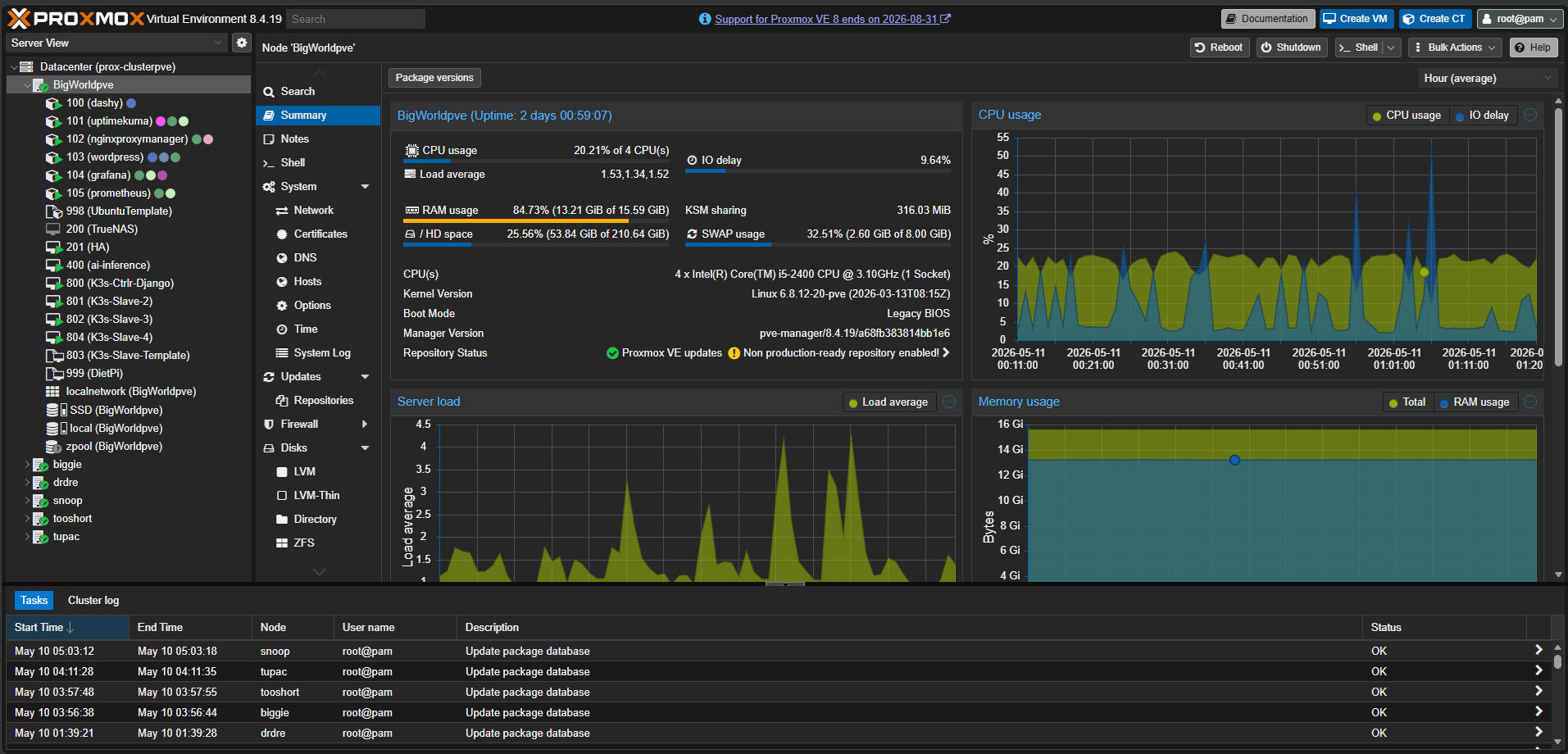
Compute: Proxmox HA Cluster (6 Nodes)
BigWorld is still the primary node. It has five friends now: Biggie, Snoop, TooShort, Tupac, and DrDre. The naming convention was non negotiable.
| Node | Role |
|---|---|
| BigWorld | Primary, cluster anchor, original lab server |
| Biggie | Compute node |
| Snoop | Compute node |
| TooShort | Compute node |
| Tupac | Compute node |
| DrDre | Compute node |
Orchestration: 12-Node K3s Cluster on Raspberry Pi
12 Raspberry Pi 4B nodes running K3s. 3 control plane nodes for HA etcd, 9 workers split by role ingress, data, and monitoring. 117+ days of continuous uptime. Not bad for hardware that costs less than a server HDD.
Storage: TrueNAS
ZFS pool with NFS exports for Proxmox VM disk images and SMB shares for media. Because if your storage isn’t redundant, your storage isn’t real.
Networking: UniFi + Cloudflare
Four VLANs: Main, IoT, HomeLab, and Guest. Zero open ports. All external traffic routes through Cloudflare Tunnels → Nginx Proxy Manager → internal service. Nobody gets in without going through Cloudflare first.
Observability: Ced’s NOC
Prometheus + Grafana + 8 exporters running 24/7. Live dashboard at noc.chasedumphord.com. More on this in the next post.
Edge: APRS RF iGate
A dual node system that receives APRS radio packets and forwards them to the internet. Bridges RF signals into IP infrastructure. Because sometimes the most interesting engineering problems involve an antenna and a Raspberry Pi Zero.
The Real Reason I Built This
People ask me sometimes: “Why build all this?”
Fair question. Nobody needs a homelab this ridiculous.
But I work on the Digital Team at GE Aerospace building data pipelines and dashboards for industrial systems MTConnect agents, machine data integration, real time operational visibility. That environment changed how I think about infrastructure.
When you’re building systems where downtime has real consequences, you stop treating monitoring as optional. You stop treating network segmentation as something you’ll get to eventually. You build it right from the start.
The homelab reflects that now. Everything I build at home mirrors patterns I apply at work. The VLAN segmentation mirrors OT/IT network separation. The observability stack mirrors production monitoring practices. The K3s cluster mirrors container orchestration at scale.
There’s a huge difference between “I watched a video about Kubernetes” and “I run a 12-node Kubernetes cluster on Raspberry Pis with 117 days of uptime.”
That hands on experience matters. A lot.
What’s Next
This blog is where I’ll document everything: homelab builds, infrastructure projects, monitoring, networking, observability, and probably a few moments where I accidentally break my own environment and have to figure out why.
Every week there’s something new breaking, something new to learn, something new to build. That’s the process. And honestly? That’s the fun part.
The next post covers Ced’s NOC how I built a production style monitoring platform on top of this infrastructure, what the full exporter stack looks like, and the lessons I learned the hard way.
If you’re building something at home that’s taught you more than any certification, I’d love to hear about it.
Chase Dumphord Digital Systems Engineer at GE Aerospace. Building industrial data systems by day, homelab infrastructure by night, out of Oxford, MS.
🔗 Links: